How to Set Up the Japanese Keyboard and Type Japanese on Windows 10/7
Translated from the Vietnamese original. View the original.
How to set up the Japanese keyboard and type Japanese on Windows 10/7
For those learning Japanese, or who want to write in Japanese on a computer but don't know how.
In today's article we show you how to set up and use Japanese input on Windows 10 and Windows 7.
To install the Japanese keyboard on Windows 10/7, follow these steps:
Step 1: First, go to Start Menu -> Settings -> Time & language -> Region & language.
Or go to Control Panel –> and choose Language.
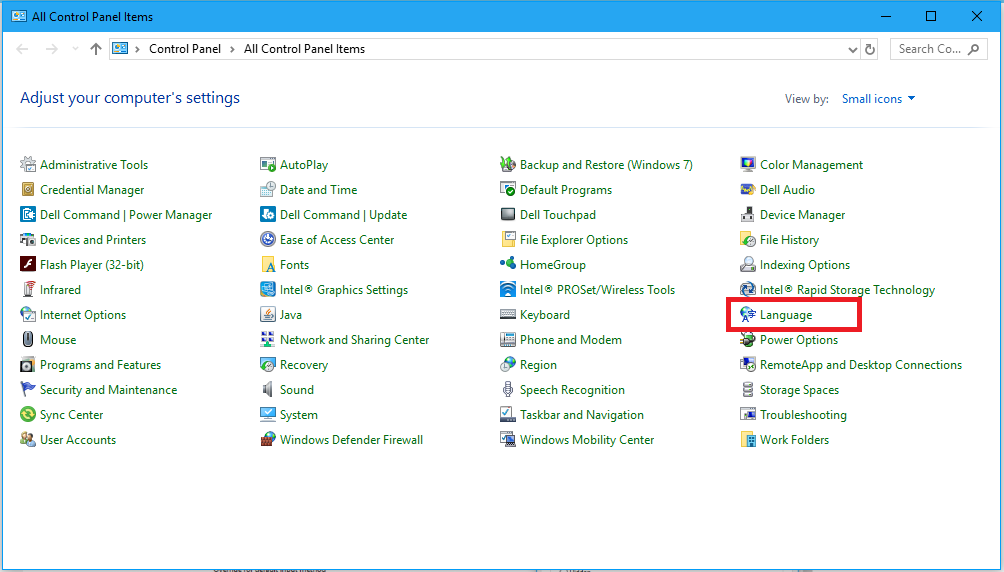
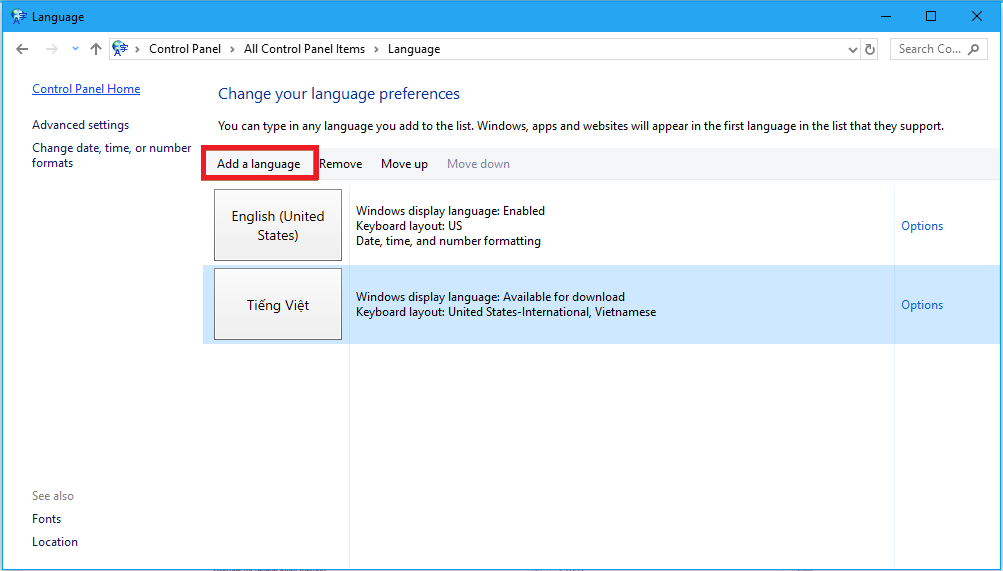
Step 2: Under Languages choose Add a language, as in the picture below:
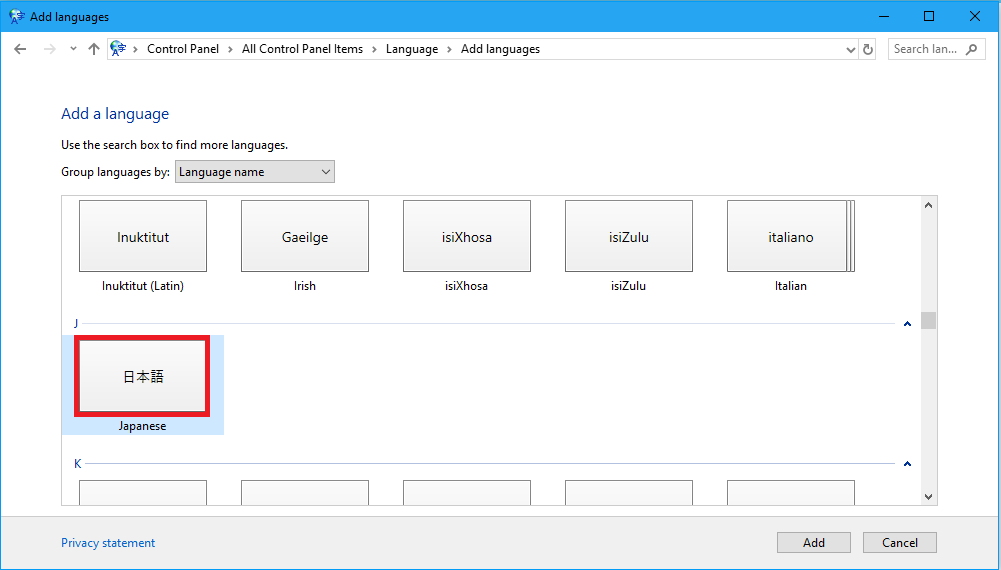
After choosing Add a Language, a list of languages appears; choose Japanese.
Step 3: Once the language has been added, a Japanese input option appears next to the default English, with Japanese Microsoft IME as the input tool.
Go to the Taskbar at the bottom right and click the ENG language icon to choose Japanese.
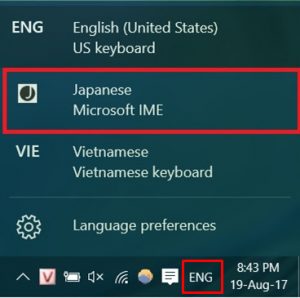
That completes setting up the keyboard and typing Japanese on Windows 10.
For Windows 7 there is one more thing to do:
Note:
Windows 10 usually already has Japanese fonts installed, but if not you can download Japanese fonts and add them as on Windows 7.
If Windows 7 is missing Japanese fonts, do the following:
Here are some common Japanese fonts: here
Download them –> unzip them –> copy all these font files into the fonts folder in Windows C:\Windows\Fonts
How to type Japanese on Windows 10/7
If you don't have a Japanese keyboard, you can type Japanese on an English one:
| Keys | Keys | Keys | Keys | Keys | |||||
| あ | a | い | i | う | u | え | e | お | o |
| か | ka | き | ki | く | ku | け | ke | こ | ko |
| さ | sa | し | si | す | su | せ | se | そ | so |
| た | ta | ち | ti | つ | tu | て | te | と | to |
| な | na | に | ni | ぬ | nu | ね | ne | の | no |
| は | ha | ひ | hi | ふ | hu(*) | へ | he | ほ | ho |
| ま | ma | み | mi | む | mu | め | me | も | mo |
| や | ya | ゆ | yu | よ | yo | ||||
| ら | ra | り | ri | る | ru | れ | re | ろ | ro |
| わ | wa | を | wo | ん | n |
(*) You can type fu
| が | ga | ぎ | gi | ぐ | gu | げ | ge | ご | go |
| ざ | za | じ | zi (*) | ず | zu | ぜ | ze | ぞ | zo |
| だ | da | ぢ | di | づ | du | で | de | ど | do |
| ば | ba | び | bi | ぶ | bu | べ | be | ぼ | bo |
| ぱ | pa | ぴ | pi | ぷ | pu | ぺ | pe | ぽ | po |
(*) You can type ji
| きゃ | キャ | kya | きゅ | キュ | kyu | きょ | キョ | kyo |
| しゃ | シャ | sha | しゅ | シュ | shu | しょ | ショ | sho |
| ちゃ | チャ | cha (*) | ちゅ | チュ | chu | ちょ | チョ | for |
| にゃ | ニャ | nya | にゅ | ニュ | nyu | にょ | ニョ | nyo |
| ひゃ | ヒャ | hya | ひゅ | ヒュ | hyu | ひょ | ヒョ | hyo |
| みゃ | ミャ | mya | みゅ | ミュ | myu | みょ | ミョ | myo |
| りゃ | リャ | rya | りゅ | リュ | ryu | りょ | リョ | ryo |
| ぎゃ | ギャ | gya | ぎゅ | ギュ | gyu | ぎょ | ギョ | gyo |
| じゃ | ジャ | ja | じゅ | ジュ | ju | じょ | ジョ | jo |
| びゃ | ビャ | bya | びゅ | ビュ | byu | びょ | ビョ | byo |
| ぴゃ | ピャ | pya | ぴゅ | ピュ | pyu | ぴょ | ピョ | pyo |
To type Katakana, type it as you would Hiragana, then press F7 and the key.
We wish you success.